Reduce the risk of service strikes while saving time and money on your project. Vislock replaces paper permits with a GIS-powered digital workflow, with full transparency over roles, responsibilities and every excavation.
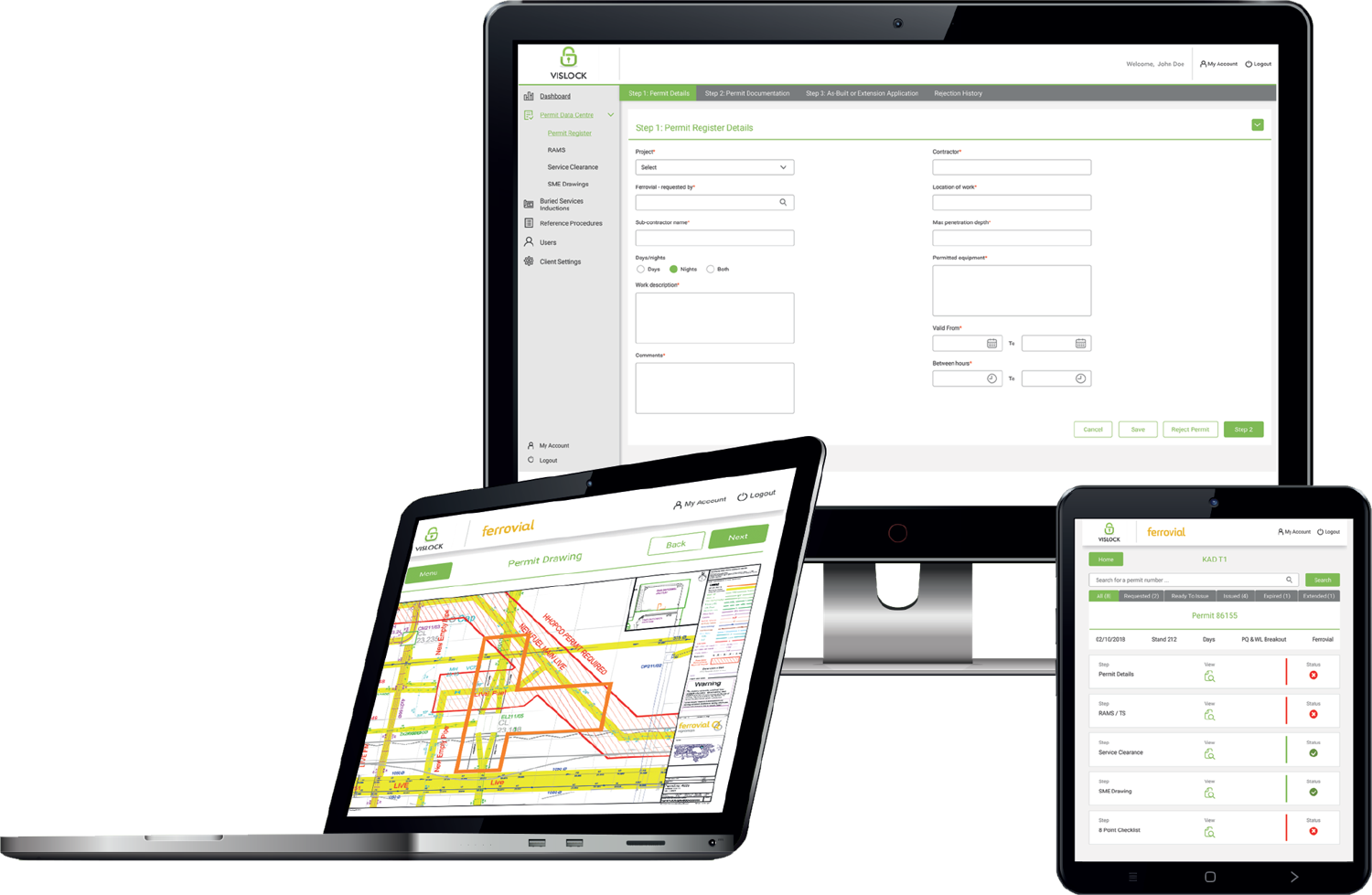
The full digital permit to dig platform for complex, multi-site programmes. GIS-powered survey data, role-based approvals across the whole permit team, real-time dashboards and complete audit trails, built to keep large teams safe and accountable at scale.
Everything a smaller team needs to go paperless. The same trusted permit to dig workflow and GIS safety checks, streamlined and priced for individual schemes and growing contractors.
Everything you need to issue a permit with confidence
Vislock brings survey data, approvals and audit trails into one place, so the right people sign off the right dig, every time.
Digital permit to dig
Submit, review and approve permits online with no paperwork or delays. Built-in safety checks prevent a permit being issued until controls are complete.
GIS-powered boundaries
Vislock uses GIS to manage survey data boundaries for STATS information, PAS 128 survey data and the permit to dig boundary, to make sure it is safe to issue a permit.
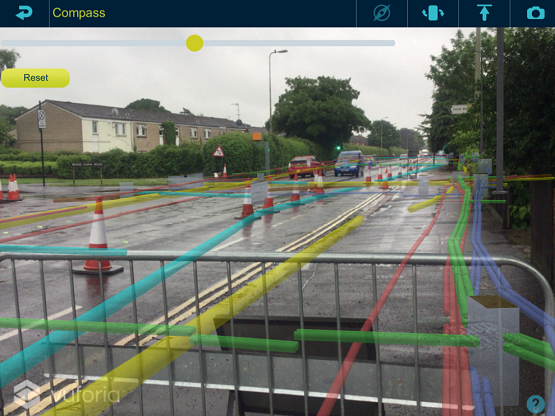
Utilities in GIS & AR
Present many types of survey data on tablets, including GIS and Augmented Reality, so assets can be interpreted easily on site.
Safer worksites
Ensures all known underground services are located with photo validation and approved before digging, with GPS validation that permits are issued at the place of work.
Full visibility & control
Live dashboards show every active and closed permit in real time, with instant access to drawings, survey data and permit history from any device.
Proven compliance
Fully aligned with HSG47, CDM and client safety standards, providing a complete audit trail for assurance and reporting.
How it works
From survey to safe dig
A simple but smart workflow that locks down the permit to dig process with clear roles and responsibilities.
01
Load your survey data
Import STATS and PAS 128 survey data and set your dig boundaries on the GIS map as one source of truth.
02
Raise a digital permit
Site engineers request a permit to dig against the mapped excavation zone and submit approved RAMS, no paperwork required.
03
Review & approve
The permit team reviews supplied documentation, marks known services on site and approves the permit from any device.
04
Dig safely, fully recorded
Work proceeds with daily checks and a complete, time-stamped record kept automatically through to permit closeout and as-builts.
Roles & responsibilities
Who is responsible for the permit to dig process?
When you partner with Vislock, a dedicated team oversees the process from start to finish. Each role has clear responsibilities and defined permissions in the system.
01
Client
Associated with the Project Manager
Oversees the project procedure and workflow setup with viewing rights — and the ability to STOP a permit at any stage.
02
Permit Manager
Associated with the Service Coordinator
Ensures STATS and PAS 128 surveys are complete on the service drawing, maintains a single source-of-truth model (GIS / CAD / BIM), sets up the system, manages documentation approval and owns the dashboard and permit log — closing each permit once as-builts are received.
System approval required
03
Permit Requester
Associated with Site Engineers
Requests a permit, submits approved RAMS and briefs the work gang on them.
System approval required
04
Permit Issuer
Associated with a Service Locator
Reviews the documentation, marks and photographs all known services on site before work starts, briefs the team on services and exclusion zones, and maintains service markings for the life of the permit.
System approval required
05
Permit Receiver
Associated with the Immediate Supervisor
Receives the RAMS briefing from the Permit Requester and the services briefing from the Permit Issuer, then updates an 8-point checklist every day.
System approval required
06
As-Builts
Associated with the CAD Coordinator & Site Engineer
Records as-built information on site and issues updates to the services drawing — ready for the next permit and to close out the current one.
See it in action
Watch Vislock in action
See the digital permit to dig platform, GIS survey data and the on-site
workflow in the Vislock team's own walkthroughs.
Over the last two years, Vislock has supported HS2 & Fusion in issuing over 5,000 permits. The figures below show the saving to the project.
5,000+
Permits issued over two years
104,000
Sheets of paper saved
130,000
Miles of travel saved
£22,000
Saved in labour costs
What people say about Vislock
Infrastructure and utilities teams use Vislock to keep their crews safe and their projects moving.
Some of my biggest issues were lost permits, time to print and prepare permit packs and also the quality of the A3 drawings used on sites. Not only does Vislock already solve all these issues but vastly improves available information, time and quality.
Scott Gizzy
Service Protection and Service Clearance Manager, Heathrow
Having worked with paper permits for well over 20 years, I can only see this being the way forward. Having all the information readily available when the site is potentially 100 miles away is a real benefit, and something I'd suggest to any organisation.
Carl Caswell
Ferrovial
The system stores all information so records of signatures, briefings and incidents can be checked even months after the permit has been closed. It's quick and easy to use and could most certainly be picked up by anyone in the construction industry.
Dan Stanton
Vision Survey
Frequently asked questions
DRAFT answers — pending Vislock review
What is a digital permit to dig?
It is the paperless equivalent of a traditional permit to excavate. Instead of paper forms and physical signatures, Vislock lets teams raise, review and approve permits online against live survey data, with a full record kept automatically.
How does Vislock help reduce service strikes?
Vislock uses GIS to overlay STATS and PAS 128 survey data with your planned dig boundaries, and requires known services to be located and photo-validated, so approvers can confirm it is safe to break ground before a permit is issued.
Can the team use it on site?
Yes. Vislock is a cloud platform with an app-based workflow, so stakeholders can raise and approve permits from a desktop in the office or a tablet or phone on site, anytime, anywhere.
Does it integrate with our survey data?
Vislock is built around GIS and can present STATS information and PAS 128 survey data, with utilities shown in GIS and Augmented Reality formats.
Is there an audit trail?
Every permit, approval and amendment is time-stamped and stored, giving you full traceability for compliance and project records, aligned with HSG47 and CDM.
Ready to start digitising your permit to dig process?
The no-obligation demonstration only takes an hour of your time and lets you explore the platform and its key features. A team member will arrange a visit, in person or online.






 For large civil engineering contractors